How to Share Your Walmart Shopping Cart with Someone

No need for messy wishlist hacks; just add items to your cart at Walmart then send a code to your recipient. They use this code to automatically load your Walmart cart into theirs! Now they can buy exactly what you specified.

Get Share-a-Cart for Chrome How it Works

90,764

Carts Shared

1K+

Carts Shared per week

30,578

Plugin Downloads

4.9

Average from 5K Reviews

Here’s How It Works

Step 1

Add Items to Your Walmart Cart

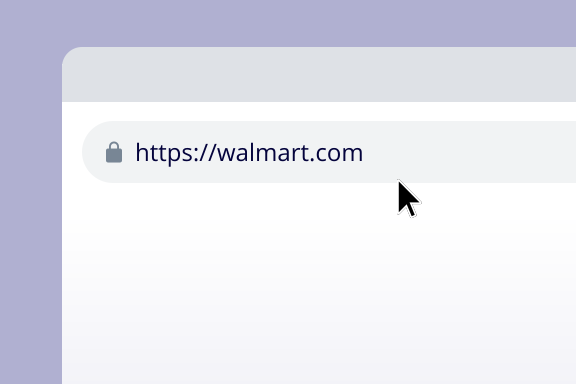
Place desired items into your cart at Walmart.com as normal

Step 2

Click to Create a Cart ID

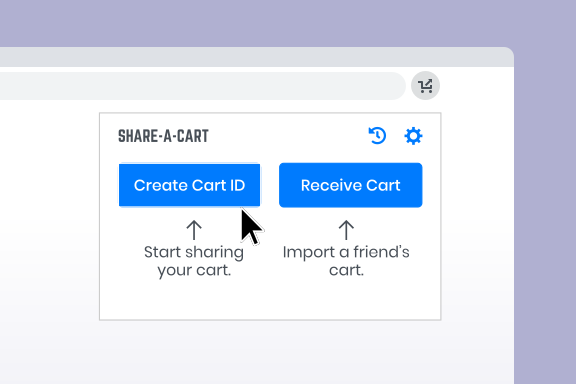
Open the Share-A-Cart browser plugin (don’t worry, no sign-up required) and click the ‘Create Cart ID’ button to generate a unique code.

Step 3

Share Your Cart ID

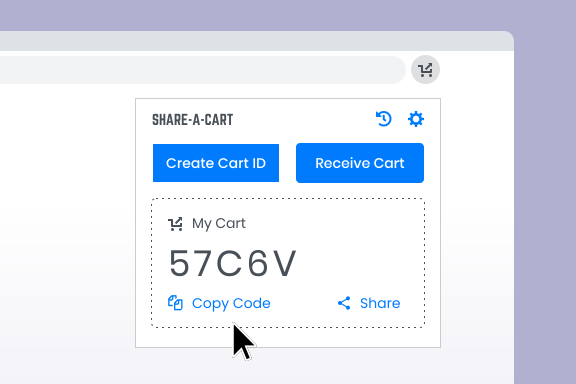
Share this code with your intended recipient by copying and pasting into a message or send it direct from the plugin via popular messenger apps.

Step 4

Recipient Loads Your Cart!

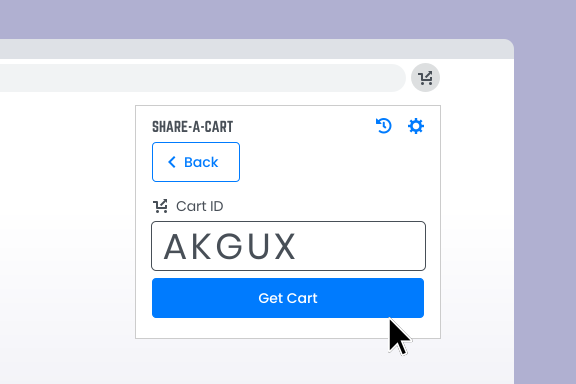
Your recipient enters this code into the Share-a-Cart plugin (or website) and voila! Your Walmart cart is instantly loaded into theirs! They continue to checkout as normal, purchasing the exact items you specified from Walmart.

Ready to Share Your Walmart Cart?

Get Share-a-Cart for Chrome

Learn More:

Super useful. Fills a weirdly necessary niche (why don’t amazon/walmart have this feature built in???)

John, New York

How do I get the Share-a-Cart browser plugin?

Just choose the plugin that’s best for you from the list below and you’ll be taken to the relevant browser add-on store where you can install it (there’s no sign up required):

Share-a-Cart for Everything
Recommended for Most People

Send and receive carts from 55 major retailers including Walmart, Amazon, AliExpress, Costco, BestBuy, Wayfair and many more. See a full list of retailers.

Share-a-Cart for Walmart

Dedicated plugin for sending and receiving carts from Walmart.com

Share-a-Cart for Grocery

Dedicated plugin for sending and receiving grocery carts, including Walmart Grocery.

What if the person I’m sharing with doesn’t have the Share-a-Cart plugin?

If the cart you’re sharing with them is from Walmart, Amazon or BestBuy, they can use the Share-a-Cart website to receive your cart if they prefer. All they need to do is enter the Cart ID you sent them on the Recieve a Cart page. For all other retailers, they will need to install and use the plugin to load your cart. This makes the whole process quicker and easier though as they don’t have to leave the retailer’s site when loading your cart.

What’s the benefit of using the Share-a-Cart plugin over the website?

With the plugin installed you don’t need to leave the Walmart site, you can just click on the plugin when ready to generate your cart ID and share instantly. It makes the process quicker and easier than having to go to the Share-a-Cart website but both achieve the same result; sharing your Walmart cart with someone for them to make the purchase.

What’s in it for Share-a-Cart? 🤔

Share-a-Cart will always be free to use as our revenue comes from the retailers themselves who pay us a small % of each shared cart that is purchsed with them. It’s a typical affiliate partnership which doesn’t cost you anything and doesn’t add any extra costs or hidden fees to the price of your cart.

What information does Share-A-Cart store about me?

As you might have noticed, using Share-A-Cart does not require a login. We do not store any personally identifiable information. Shopping lists only contain a unique id, but no information about who created it or who used it. You can find more information in our Privacy Policy.

See More FAQs Get Share-a-Cart for Chrome

Makes it easy to pass massive carts on to procurement. (I work for Amazon).

Mary, London

Super useful, great for placing orders within remote teams

Shivani, San Francisco

This is working great for a really annoying issue; I have a business and a personal Amazon account and I continually build my cart only to realize that I’m in the wrong account. This plug-in saves me a ton of time.

Adel, Berlin

This is why I love extensions and this one is downright magical: 1-click and my entire Walmart cart is packed and ready to be used. 1-click at destination and the entire cart is reloaded and ready to be purchased. THANK YOU

Sophie, Paris

This extension is awesome and it works well. It allows me to share grocery carts for recipes with my friends and I can’t recommend it enough

Chi, London

This is pretty cool and simple. It helps when you have more than one person in a household purchasing on Amazon. We can just share the cart and know what’s needed

Jan, Stockholm

Share Your Cart From 55 Major Retailers Including:

walmart.com
walmart.com
walmart.com
walmart.com
walmart.com
walmart.com
walmart.com
walmart.com
walmart.com
walmart.com
See Full List of Retailers

Ready to Share Your Walmart Cart?

Get Share-a-Cart for Chrome

Subscribe to our newsletter for product updates:

Subscribe

We’ll never spam you. Unsubscribe at any time

© 2021, Share-a-Cart